My Stack - going local
My yearly dive into my tech stack - the tech I use on a daily basis. Resetting habits, going local, progress not perfection.
This is my yearly post where I explore and explain my stack - the tech I use. The last time I did this was just over a year ago and you can view it here What stack do I use?. In the post a year ago I listed blogs from others including Doug, Matt and Steve. Doug wrote an update recently, including the idea of having a tech disclaimer, I like that, meaning that if I'm going to talk and write about tech, I should be up front about what I use. As me and Doug have now launched TechFreedom, this is probably more important than it was, both as a transparency piece, but also as a way of saying that even I, who talks about TechFreedom still struggles in some areas to break free.
Reviewing my previous blog it was interesting to see the seeds of TechFreedom and the approaches I wanted to take becoming clear, namely more European, more open source, more local.
What I use
General workspace
I've gone from two Google workspaces, to one google workspace and one proton workspace. My reliance on Google has definitely decreased. In fact the main things I still use Google for is Email and Slides. Email is easy to move away from really. Slides is still one that has a lot of value.
Alternatives: I recently set up a local Etherpad instance for collaborative docs to go along with proton, meaning docs is pretty much redundant. I really like etherpad, I like that it is local (running on a mac mini with cloudflare tunnel)
Browser
I use Firefox and Chrome
Why: Last year I was using Arc, but they got bought out by atlassian, which combined with a feeling that they just weren't that bothered about actually improving browsers really mean I moved over to Firefox more with Chrome for some things.
Alternatives I'm exploring: Brave and Ecosia
Blog
I still use Ghost, it's excellent. I moved it from hosting on Digital Ocean to self hosting on my mac mini.
Why: Ghost still offers me pretty much everything I need from a blog. I didn't really know if a blog would still for me last year, so the one click install on digital ocean was the lowest friction approach. Now I write here fairly consistently I wanted to move to self hosting, and did that recently, offering me more control (and some long term cost savings)
Alternatives I'm exploring: none
Website
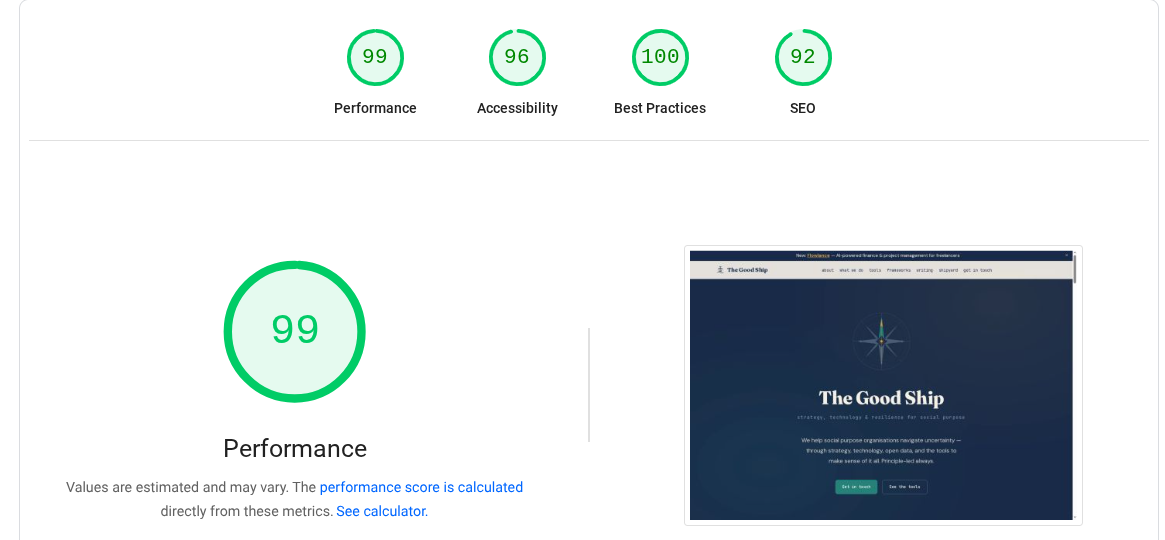
A lightweight HTML site served through Cloudflare
Why: Having closed Data For Action I realised I'd neglected the Good Ship website for so long. I'd previously used things like Carrd (a simple no code builder). I wanted something with more control, so self designed a new site. I wanted it to be fast and very lightweight. I also wanted it to serve a feed from this blog via the RSS feed. I feel I succeed in several areas. Whether it's actually good is another question..
Analytics
I STILL use Plausible analytics whenever I actually use analytics.
Why: It's lightweight, simple, none intrusive. It doesn't use cookies, and doesn't capture personal data. It's also EU made and hosted.
What alternatives am I looking at: None at the moment, but Fathom is another alternative that is similar. Do you really need Google Analytics?
Time Tracking and invoicing
This has been a big shift for me, moving away from a custom Airtable base to actually building my own tool - Flowlance.
Why: I wanted more than the airtable was offering, and so I built a full feature tool to manage my who freelance buisiness - time tracking, invoicing, proposals, contracts, contacts, cashflow.
Alternatives I'm exploring: none. I continue to develop Flowlance.
Storing stuff/random apps/prototype databases?
I've been a bit more intentional trying to ensure my default to protoyping/random apps/storing stuff is local first and simple. Lots of markdown, SQLite, indexedDB. I like pocketbase. I've mostly moved off Airtable to a self-hosted Baserow, thought still use Airtable quite a bit with clients.
Tiny boring tools
One of the actual biggest game changer for me this year has been a self built tiny boring tool I called LinkFlow. It's a link saver tool. I spent too much time trying to save links and make use of them last year. So I built a tool which saves links, and uses a small local model (ollama on desktop, google nano on mobile) to auto tag the link. This is saved locally and synced and then indexed on github. I can then produce a digest of links each week and because I built a link directly to ghost I just push that digest to the bottom of a weeknote and then add those links to the Interesting Things page. This has saved me so much time, for a free and very simple tool
Repos
Still using github.
Why: it's still been the default. Their general decent into crappiness, AI training, increased downtime and Microsoft ownership is pushing me away.
Alternatives I'm exploring: self hosted Gitlab and Framasoft
Forms
I built my own Forms platform (called DriftForms) as I was so annoyed with all the other forms platforms out there.
Deployment and cloudhosting
Vercel, Scaleway, Bunny
Why: what a hodgepodge eh? Vercel was the lowest friction and so was previously a default. But I wanted to intentially move more to EU deployment if it couldn't be local. Scaleway and Bunny are EU platforms that can do much of the things Vercel can, even if not all the things, and not quite so easily.
AI
Where to begin. I have moved and jumped around on this over the year, and continue to have a large mix and flexibility. I moved away from cursor, used a fair bit of Claude Code, moved to OpenCode, used Open Router, EuRouter. I still believe in creating as much flexibility for myself as possible. I have more and better local models running now I have the mac mini. I'd like to increase my options by having more local model availability but need a more powerful mac, and there is a shortage of those at the minute. In terms of models/providers I've used claude opus, sonnet, haiku, mistral, gemini, minimax, qwen, deepseek, kimi, greenpt, ollam, nano, lama, nova...Choosing models and providers is not easy, there are so many. I even built a tool to help because even as someone who tries to keep on top of this stuff it can be hard.
Overall reflections
Last year I wanted to explore moving away from big tech and specifically US tech more. I think I've made good progress this year, but am still not perfect. I've got more things running locally, which I enabled by purchasing a mac mini (the irony of moving away from US tech by umm, buying US tech is not lost on me). It's been interesting to rewire my defaults - we get so tuned to specific habits (google doc, good auth, github + vercel) that breaking them can feel hard, even if the actual thing isn't much harder (although sometimes it really is harder!). Running TechFreedom has definitely helped with some of that (we launched the website and newsletter on EU tech which was fun).
AS you'll see from the things above, there's lots of non default tools, and finding alternatives can always be hard. The TechFreedom website has an assessment page, which if you input all the tools you use, should give you both a risk assessment and a list of alternatives. Obviously a list of alternatives on it's own won't help (or else why would we be running a programme on it) but it might help you even consider moving.
So progress, not perfection is the moto for this years My Stack blog i reckon. I'm happy with that.